Monday, November 16, 2015

I have to rant against PayPay (and a lot of other 'self service/help' docs.

Just venting some frustration with PayPal.

So I moved more than 2 years ago.  I've updated my address everywhere that paypal will let me.  However, I still get my old address filled in by default on websites.  A Lot. It's starting to drive me crazy.

So I open a support email with PayPall via there 'contact' page and vent a little. Not expecting much to happen, but what ever. Their software does some keyword matching and sends me some FAQ's.  Not a bad idea, except they're wrong.

The email says:

How do I update my mailing address?

Here's how to update your street address:

      1. Log into your PayPal account.
      2. Click the settings cog beside "Log out".
      3. Click Update beside "Address."
      4. Click Edit.
      5. Enter your address information and click Save.

If the new address is your home address, click Make Home. If it is a business address, click Make Business.

Here's how to remove your old address:

      1. Log in to your PayPal account.
      2. Click the Profile icon beside "Log out."
      3. Click Update beside "Address."
      4. Find the address you want to remove and click Remove.  

A few things about this.  One the two steps are different. Once says 'click the settings cog' which is right, the second says 'Click the Profile icon' which doesn't exists.  It's on the same page.  Someone didn't bother to proofread.   Now, assuming you figure out that they really meant cog icon, you get this:

There's no Update anywhere on the page!   The only occurrence of the word is a link to "policy updates" which is a footer on every PayPal.com page.   

I'm supposed to trust paypal with my money when they can't get the simple stuff right? As with most companies, it's not a wether you do the right thing in the big moments, but rather if you do them in the small moments.

Anyway, rant over.  I feel slightly better.

Tuesday, September 8, 2015

Locked out of my August smart lock (sorta)

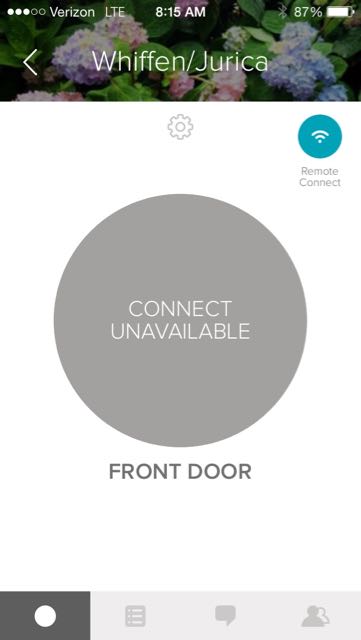
A deliberately salacious headline.  So this morning I had this sneaking suspicion that I forgot to lock the door.  No problem!  I bought a smart lock just to solve this problem!  Open the app, click the wifi button and this is what I see.


GAH! the wifi connect has failed again!  Commute back home from work and sure enough, the red light is blinking.  This is the 3rd time the remote connect has let me down.  It's to the point now where I don't trust it and almost wish I'd never gotten it.

The app needs an upgrade.  It should give me a warning when the WiFI can't phone home.  It should also restart itself if it can't phone home after X hours, where X is a configurable number.  I've sent my suggestions via their support channel, we'll see what they say.

Overall, I'm not as happy as I could be with this setup.  When it works, it's brilliant, but the large size of the nob, the cover falling off when smaller hands try to turn it and now with the issues with the wifi connect cropping up it's harder and harder to recommend this.

Friday, July 24, 2015

Lost another Withings Pulse...

So I lost another Withings Pulse the other day.

It was my forth Pulse over all, and is the second one I lost.

I lost my first one by attaching it to the key pocket on my 5-pocket jeans rather than the waste band.  I did it because I hadn't put my belt on yet.  Proceeded to put my belt on but failed to move it for some reason.  It was Tuesday, election day.  I went in to vote and somewhere on my commute to work, realized I had lost it.  This will become a recurring problem with me.  I wear the thing on my right side, and the seatbelt can knock it loose.

The second one had technical problems and Withins Support was awesome about it and replaced it after a bit of back and forth with them, even though I had bought it second hand.  Top marks to Withings customer support (I have contacted them about other things too, and they did well in those cases also).

The third one went into the ocean with me.  It still works as a pedometer, but the O2 and pulse features are shot and the battery only lasts 4 hours.  Salt water is very hard on electronics as you might have guessed.  I thought it was completely fried, but after drying it out and leaving it for 24 hours, then fully charging it, it came back to life, albeit with limited functionality.

The forth one simply popped out of it's rubber holder, again while getting out of my car I suspect. I had been very lucky with this one.  It went into the pool with me once.  The rubber cover kept it dry enough and it suffered no ill effects.  I had lost it before in a similar fashion, but retracing my steps I always found it.  I retraced my steps this time but it didn't turn up. I suspect someone else found it or I didn't loose it where I parked my car.

So now I'm using my phone to measure my steps which turns out to work ok, since I take my phone with me most places.  I think it might be a little generous with the step counts however.  I'm debating on getting another one.  Going to have to put a saved search on ebay and craigslist.  Maybe if I can score one cheap enough I'll do it again.  I need to find a use for all these Pulse accessories I have...

Saturday, July 18, 2015

Bought an August Smart Lock for the house. First impressions

So I bought an August Smart Lock on Amazon's 'Prime Day' (what a let down that was).  Here's my first impressions.   It's very nicely packaged.  They took a page from the Apple playbook and made the unboxing experience elegant.  No blister packs to cut open, just some tape holding the lid of the box closed. There's basically 3 parts.  The smart lock, the mounting plates and the adapters.


Now the website claims:

UNIVERSAL
Package includes deadbolt attachment adapters to accommodate standard deadbolts sold today.

Which is true for the most part, but when you get the instruction booklet out, you see a few asterisks, but they're for only a couple of variations and they advise contacting support.  I suspect they have adaptors or alternate screws for those models.


Anyway, you mount the appropriate plate, put the appropriate adaptor on the deadbolt shaft, and then mount the unit.


It goes on in minutes, and batteries are included!


Now's when I'm realizing I've made a mistake in color choice, although champagne might not have looked any better, and the black and red would have been just as bad.


And as you can see by my hand, this thing is big.  I mean way bigger than I thought it was going to be.  It's also a lot thicker than I thought it would be. I don't think the pictures on the website give you a true picture of just how chunking this thing is. It looks awkward on my door since it's so much bigger than the actual door nob.

Ok, moving past it's bulk, it works just like I hoped it would.  First you have to sign up via the app, then you calibrate the open and close positions and you're ready to go.  I was done in 15 minutes.  Waiting for the app to load download was one of the longer parts of the entire process.  The lock opens and closes smoothly and has indicator lights and an audible chime (which can be turned off) when it's done.

It's not all hugs and lollipops however. As the website claims, you can still open it the old fashion way.  Simply turn the incredibly large nob, which is ok for grownup hands.  However, my kids hands aren't so big.   When you grab it with smaller hands and with the palm covering the face of the unit, you often times pop the cover off unintentionally without unlocking/locking the lock.


My hands are big enough that it's not a problem but my kids, who grab with the grip in the photo, pop the cover off rather than unlocking the lock. I think they'll get used to it eventually.  

Now we just sit back and wait for the Xfinity Home folks to make good on their commitment to integrate with 3rd party devices


Tuesday, July 30, 2013

Digifit and Bluetooth Smart

I have had ANT+ fitness gear for a while now.  I talked about getting some here, but never actually posted what I eventually bought it seems.  Although I bought it ala cart and different generations of the components, I essentially bought this bundle. Which works amazingly well with the iPhone.  The heart rate and stride sensor for running, heart rate and speed/cadence for biking.  I wish ANT+ would have been more successful.  It's a great technology, and doesn't chew through battery the way standard bluetooth does.  Unfortunately the dock connector for my iPhone 4s is getting flakey, which means that the transceiver needed to talk ANT+ wouldn't always work.  It was getting to the point where I would spend 10 to 15 minutes each run or ride trying to get the stuff to talk.  On top of that I'm due for a new phone in November, and it won't have the same connector.

So that lead me to find a replacement setup that would be iPhone 5 (or what ever the next model is going to be) compatible. It quickly became apparent that the new setup was going to be BlueTooth Smart (aka BlueTooth LE or BlueTooth 4.0).  It offered dongle-free connections and no longer required line of sight to the sensors to work.  It also puts me in a good position if Android ever gets off their asses and gets full BT 4.0 support (which according to the various news sites is 'soon-ish').  So should be in a pretty good place with the new gear and not tied to the iPhone exclusively.

The first thing I bought is the Polar H7 Bluetooth Smart Heart Rate Sensor. It's got a pretty comfy strap, has reasonable reviews and reputation.  I considered Wahoo fitness's version of the device but the reviews were a little less favorable and a little more expensive. So far it's been performing very well, but I did learn that it matters what way you snap it into the belt.  If you put it in backwards it won't sync.  So if you have a Polar H7, and it worked one day, and not the next, try popping it off and putting it on strap the other way.  Maybe you have it backwards like I did.

The next thing I bought was a Wahoo Fitness Blue SC Cycling Speed & Cadence Sensor for iPod/iPhone for the bike.  It's pretty straight forward to install, installed a lot more securely than the Garmin unit I had before.  The shape fits the tube on my bike better I guess. The magnet by the pedals fits better too.  It's a nice unit and was the most affordable name brand I could find.  So far after a week's worth of rides it's been doing great.

The last thing I bought was the Polar Stride Sensor Bluetooth Smart. I don't know how well this one works yet, because it's not supported by many apps yet.  The Polar app does (of course) but I don't want to start down that rode just yet.  Support for the sensor is in indefinite coming soon category.  Hopefully I can get in on the beta and begin counting my strides again.


Saturday, July 27, 2013

Ordered a ChromeCast

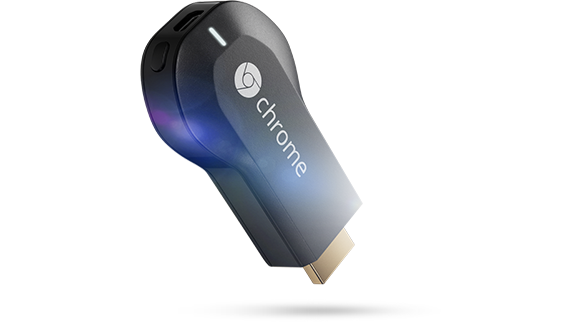
I, like a lot of gadget obsessed people, was intrigued by the google announcement of their ChromeCast device. It will probably upset most of the content providers to the point that they will put restrictions on it (I agree with Mr Kafka's assessment of what content providers reactions are going to be).

Not going to re-hash it hear other than to say it plugs into your TV's HDMI port and then allows you to display stuff from your Google device (tablet, phone, chromebook, etc) onto the TV. It has an amazing price point: $35. It will eventually work with all Google Android and HTML5 based apps.

It's basically going to be Google's 3rd attempt at getting mobile and web content onto the TV. First there was Google TV which didn't take off. It was cool, but not cool enough. It's still around, but it's kind of an afterthought since most smart TV's already do what it did for you. Next came the Nexus Q which was another flop. So much so that the google play service doesn't even work with it anymore. Now we have the ChromeCast.

The initial user reports coming in are all overwhelmingly positive, but they were pretty positive for the first two attempts too. Here's why I think it's going to be a hit: Price point. It's so cheap people will buy one even if they're not 100% sure they'll use it. There are a truckload more android phones out there than before. It's very simple, no wires, adapters or power cords.

Apple has it's version of this technology called AirPlay, which as been around for a while. It didn't get a whole lot of traction. The ability to stream music from my iMac to my Airport Express was neat, but not the ultimate solution. Then came the AppleTV. Ok, little cooler, now I can play to my TV speakers, both audio and video. Add iPhones to that mix, and it started to take off a lot more. My kids and their friends make videos on the iPad and then instinctively know how to double tap and bring up the output selector and stream their new creation to the TV instead of huddling around the small screen. I also have an iHome W3 portable speaker I recently acquired to play music from my phone, tablet or PC.

Here's one interesting aspect of AirPlay that I don't think Chromcast can match in it's current incarnation. On both my AppleTV and W3 speakers I have control buttons (a remote for the AppleTV, they're built into the W3speaker). If I press those buttons while someone is streaming to the device, the remote presses are sent to the streaming device. So if my phone is in the charger up stairs playing music to the speaker in the kitchen, I can play, pause, volume up/volume down with out having to go to the source device. I think that's missing in the ChromeCast device. How many people have a phone charger on the couch with them so they can keep their phone with them while it's streaming without worrying about battery? The notion of the phone/tablet being the player and the remote is going to present some battery life issues for people who don't charge their phone in the same room as they chromecast. It's still going to sell like crazy though. It's already sold so many that google has stopped the 3 months of free Netflix promotion.


Monday, May 13, 2013

Website to FaceBook Ad in under an hour

Got surprised today.  I was looking at a tent on w00t.com today.  I wanted to see if it was a good deal, if there were reviews, etc on it.  One of the links was on OverStock.com.  Less than an hour later, I'm looking at facebook and I get the following:
So in less than an hour, the browser cookie from OverStock.com has been correlated to me in Facebook. In theory, now OverStock, who had no idea who I am other than a web user, now knows as much about me as facebook can sell them.

I guess the linking doesn't surprise me that much, it's just the speed in which it was done.  It was faaaast.  All my banner ads are now for tents as well.  The future is now... and it's CREEEEEEPY.